Telegram-PC-Controller-Bot
🖥️ Telegram PC Controller
Control your Windows PC remotely from Telegram — anywhere, anytime.
A Python all-in-one application with a modern dark GUI that runs a Telegram bot, giving you full remote control of your PC from your phone.
[!TIP]
⚡ SKIP THE SETUP? JUST USE THE .EXE! ⚡
No need to install Python or mess with the command prompt. Simply download
TelegramPCController.exefrom the Release page, double-click, and start controlling your PC instantly!For premium features contact Nothing-dot-exe
Author: Nothing-dot-exe
✨ Features (30+ Commands)
🔧 System Control
| Command | Description |
|———|————-|
| /screenshot | Capture and send your screen |
| /webcam | Capture photo from webcam |
| /lock | Lock the workstation |
| /shutdown | Shutdown PC (30s cancel window) |
| /restart | Restart PC (30s cancel window) |
| /sleep | Put PC to sleep |
| /logoff | Log off current user |
| /cancel | Cancel pending shutdown/restart |
📊 System Monitoring
| Command | Description |
|———|————-|
| /status | CPU, RAM, Disk, Battery stats |
| /processes | Top 15 processes by CPU usage |
| /ip | Local and public IP addresses |
| /drives | List all drives with usage |
| /uptime | System uptime since boot |
| /wifi | Current WiFi connection info |
📁 Apps & File Management
| Command | Description |
|———|————-|
| /tasklist | List all running applications |
| /kill <name> | Kill a process by name |
| /open <path> | Open any file or application |
| /cmd <command> | Run a shell command |
| /download <url> | Download a file to Desktop |
| /sendfile <path> | Send a file from PC to Telegram |
| /browse <url> | Open URL in default browser |
🔊 Media & Display
| Command | Description |
|———|————-|
| /volume <0-100> | Set system volume |
| /mute | Toggle mute on/off |
| /brightness <0-100> | Set screen brightness (laptops) |
| /media <action> | Media keys: play, pause, next, prev, stop |
| /say <text> | Text-to-speech on PC |
💬 Utilities
| Command | Description |
|———|————-|
| /alert <msg> | Show a popup message on PC |
| /clipboard | Get current clipboard content |
| /setclip <text> | Set clipboard content |
| /note <text> | Save a note to Desktop |
| /myid | Show your Telegram User ID |
🚀 Quick Start
Prerequisites
- Python 3.8+ installed (Download)
- Telegram account
Step 1: Create Your Telegram Bot
- Open Telegram and search for @BotFather
- Send
/newbotand follow the prompts - Copy the API Token (looks like
1234567890:ABCdefGhIJKlmNoPQR...)
Step 2: Get Your User ID
- Search for @RawDataBot on Telegram
- Send
/start - Copy the number next to
"id":(e.g.,8375426834)
Step 3: Install Dependencies
pip install -r requirements.txt
Step 4: Launch the GUI
Double-click Start_Controller.bat or run:
python TelegramController.py
(Need help? 🎥 Watch GUI Start Demo)
Step 5: Configure & Start
- In the GUI, paste your Bot Token and Chat ID using the 📋 paste buttons
- Click SAVE
- Click the big Power Button to start the bot
- Open your bot on Telegram and send
/start🎉
(Need help? 🎥 Watch GUI Config Demo)
⚙️ GUI Manager
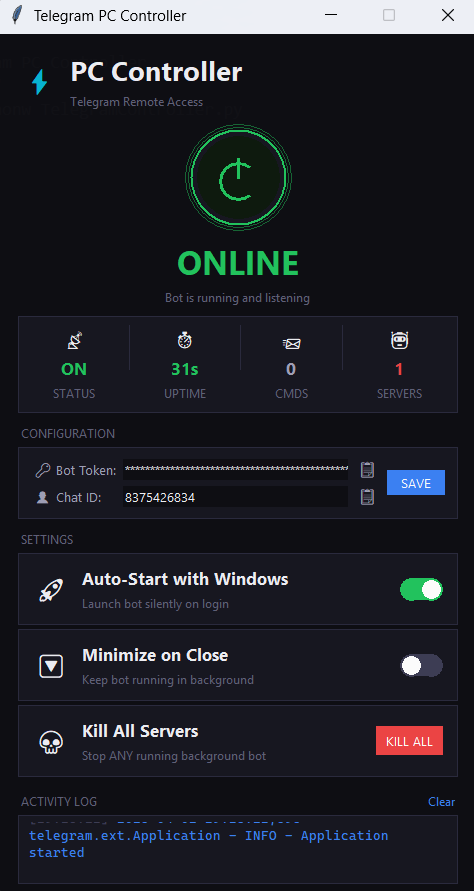
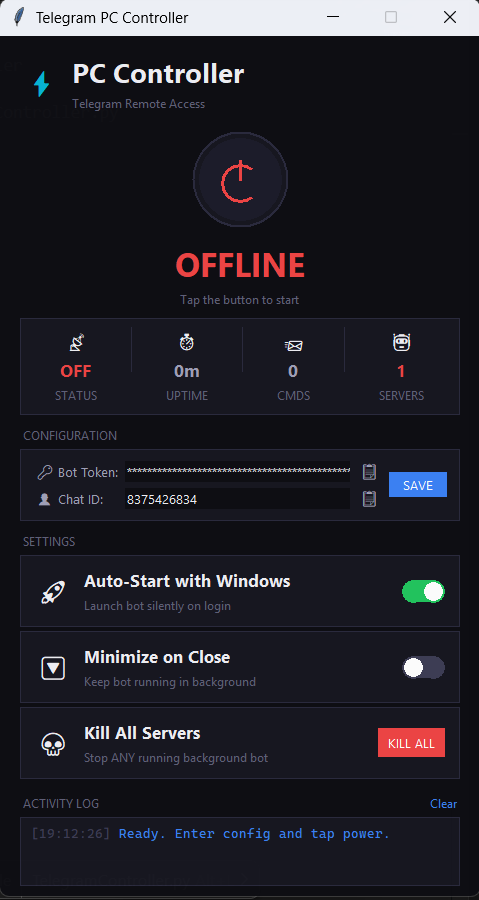
The GUI provides a single-window control panel for your bot:
| Feature | Description |
|---|---|
| Power Button | One-click Start/Stop the bot |
| Status Dashboard | Real-time status, uptime, command count |
| Server Monitor | Shows how many bot instances are running in background |
| Kill All Servers | Instantly stop ALL background bot processes |
| Configuration | Enter Bot Token & Chat ID with paste buttons |
| Auto-Start | Toggle to run bot silently on Windows login |
| Minimize on Close | Keep bot running when GUI is closed |
| Activity Log | Live feed of bot events and errors |
| GitHub Link | Opens author’s GitHub page |
📦 Dependencies
| Package | Purpose |
|---|---|
python-telegram-bot |
Telegram Bot API framework |
psutil |
System monitoring (CPU, RAM, Disk) |
pyautogui |
Screenshot capture |
pycaw |
Windows audio control |
comtypes |
COM interface for audio |
requests |
HTTP requests (public IP, downloads) |
opencv-python |
Webcam capture (optional) |
🔒 Security
- ✅ User ID Whitelist — Only your Telegram account can control the bot
- ✅ Unauthorized users get “⛔ Access denied” and are logged
- ✅ Dangerous commands (shutdown/restart) have a 30-second cancel window with inline buttons
- ✅ Command timeout — Shell commands timeout after 30 seconds
- ✅ Token hidden — Bot Token is masked in the GUI with
*** - ✅ Config stored locally — Credentials saved in
config.json, never hardcoded
⚠️ Important: Never share your bot token or
config.jsonpublicly.
🔄 Auto-Start with Windows
No need to manually edit startup folders or registry:
- Open the GUI
- Toggle Auto-Start with Windows → ON
- Done! The bot will start silently every time you log in.
To disable, just toggle it back OFF.
📁 File Structure
📂 Telegram PC Controller/
├── 📄 TelegramController.py      # All-in-one script (GUI + Bot)
├── 📄 requirements.txt           # Python dependencies
├── 📄 Start_Controller.bat       # Silent one-click launcher
├── 📄 config.json                # Saved credentials (auto-generated)
└── 📄 README.md                  # This file
🛠️ Troubleshooting
| Problem | Solution |
|---|---|
| Bot says “Unauthorized” | Use /myid to get your real ID and update Chat ID in GUI |
| Bot goes offline immediately | Check Activity Log for errors; ensure token is correct |
| “Another instance running” | Click Kill All Servers in the GUI |
| Screenshots not working | Install pyautogui: pip install pyautogui |
| Volume control error | Install pycaw and comtypes: pip install pycaw comtypes |
| Webcam not working | Install OpenCV: pip install opencv-python |
| Brightness not working | Only works on laptops with WMI brightness support |
| Can’t find config | Run the GUI once and click SAVE — config.json is auto-created |
📜 License
This project is for personal use only. Use responsibly and only on machines you own.
🤝 Credits
Built with ❤️ by Nothing-dot-exe
Powered by python-telegram-bot